


Home / Medical forms / CMS-1500
CMS-1500 claim form OCR, box by box
The CMS-1500 (formerly HCFA 1500) is the paper claim physicians, practices and suppliers send to Medicare, Medicaid and most commercial payers. We set up software that reads it, checks the doubtful boxes with a person, and sends the claim to your system.
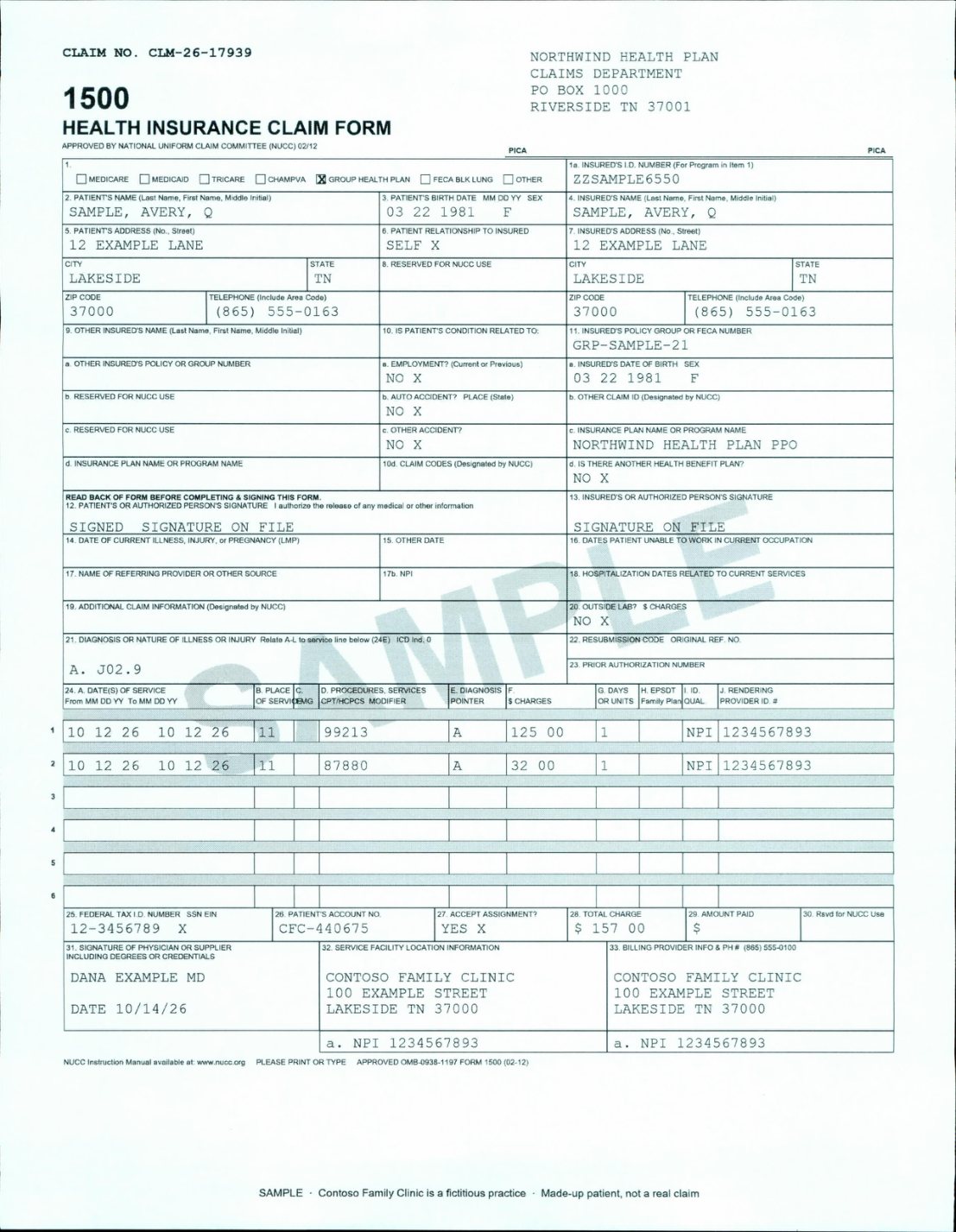
What can be read, box by box
A job reads the boxes you need, so you can start with a few and add more later. Typed claims read most reliably; hand print in the boxes can be read too, depending on the writing, and anything doubtful stops on screen for a person.
| Box | What it holds | Read as |
|---|---|---|
| Top right | Payer name and address | Printed text |
| 1 | Type of insurance: Medicare, Medicaid, TRICARE, group plan and others | Tick box |
| 1a | Insured’s ID number | Printed text |
| 2, 3 | Patient’s name, birth date and sex | Printed textTick box |
| 4, 7, 11 | Insured’s name, address, policy group number and plan | Printed text |
| 5 | Patient’s address and phone | Printed text |
| 6 | Patient’s relationship to the insured | Tick box |
| 12, 13 | Patient’s and insured’s signatures | Signature |
| 17, 17b | Referring provider and NPI | Printed text |
| 21 | Diagnosis codes A to L and the ICD indicator | Printed text |
| 23 | Prior authorization number | Printed text |
| 24A to 24J | Service lines: dates, place of service, CPT/HCPCS code and modifiers, diagnosis pointer, charges, units, rendering NPI. Up to 6 lines | Table |
| 25, 26 | Federal tax ID and the patient’s account number | Printed text |
| 27 | Accept assignment | Tick box |
| 28, 29 | Total charge and amount paid | Printed text |
| 31 | Signature of physician or supplier, and date | Signature |
| 32, 32a | Service facility and its NPI | Printed text |
| 33, 33a | Billing provider, phone and NPI | Printed text |
Our run on sample CMS-1500s
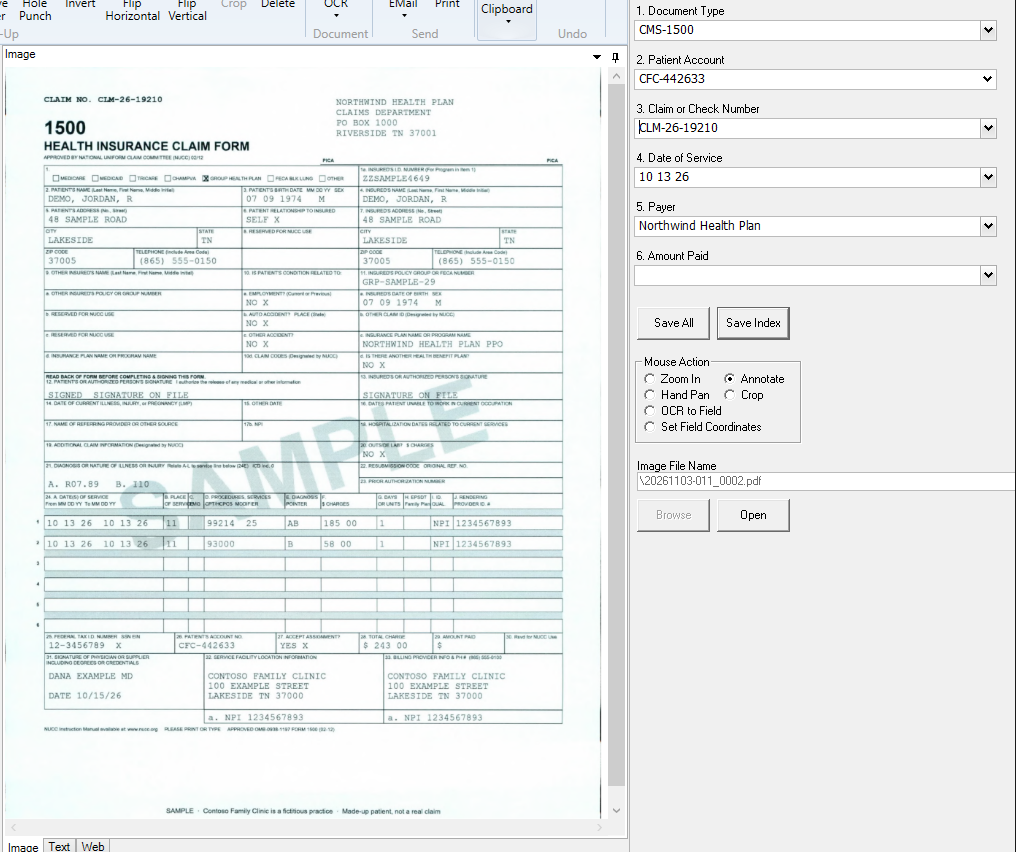
We printed made-up CMS-1500s for Contoso Family Clinic, mixed them with UB-04s and EOBs, and scanned the stack as one batch. SimpleIndex told the forms apart and read five values from each claim.
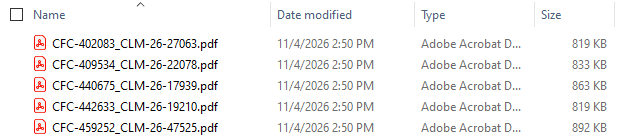
The five values: form type, patient account (box 26), claim number, payer and date of service (24A). Each claim was saved as one PDF named by account and claim number.
Box 24, line by line
A second job reads the service lines as a table with AWS Textract, for the 837P export. All 11 lines on the five sample claims came out right, as read:
| Patient account | Date (24A) | Place (24B) | Code (24D) | Modifier | Pointer (24E) | Charge (24F) | Units (24G) |
|---|---|---|---|---|---|---|---|
| CFC-440675 | 10 12 26 | 11 | 99213 | A | 125 00 | 1 | |
| CFC-440675 | 10 12 26 | 11 | 87880 | A | 32 00 | 1 | |
| CFC-442633 | 10 13 26 | 11 | 99214 | 25 | AB | 185 00 | 1 |
| CFC-442633 | 10 13 26 | 11 | 93000 | B | 58 00 | 1 | |
| CFC-409534 | 10 14 26 | 11 | 99396 | A | 240 00 | 1 | |
| CFC-409534 | 10 14 26 | 11 | 36415 | A | 18 00 | 1 | |
| CFC-409534 | 10 14 26 | 11 | 80053 | A | 46 00 | 1 | |
| CFC-402083 | 10 15 26 | 11 | 99213 | A | 125 00 | 1 | |
| CFC-459252 | 10 19 26 | 11 | 99395 | A | 225 00 | 1 | |
| CFC-459252 | 10 19 26 | 11 | 90686 | B | 42 00 | 1 | |
| CFC-459252 | 10 19 26 | 11 | 90471 | B | 28 00 | 1 |
Checks that catch CMS-1500 mistakes
Reading the box is half the job; the other half is stopping a wrong value before it reaches billing. Values that fail a check stop on screen in red:
- an NPI in 17b, 24J, 32a or 33a that isn’t 10 digits
- a date of service that isn’t a real date
- a patient account or payer that isn’t on your list
- any value the software read with low confidence
FlexiCapture can also check boxes against each other, for example that the line charges add up to the total in box 28, or that each diagnosis pointer in 24E points to a code in box 21.
Which product for CMS-1500s
Both read every box above on your own computers. The difference is volume and who checks the claims.
Smaller volume
SimpleIndex 12
Fits a practice or billing office that scans its own claim copies, wants each claim filed as a PDF under the patient account, and exports the values to a spreadsheet or database. Service lines are read with AWS Textract or an AI model, which can run on your own server.
Large volume
ABBYY FlexiCapture
Fits a payer, clearinghouse or large billing service with thousands of CMS-1500s a month, a verification team, and a claims system that takes 837P files.
Our SimpleIndex results for claims come from our own test batches of sample forms. Send us sample or masked forms and we’ll run them before you decide.
Questions
Which version of the form does it read?
The current 02/12 version, which hasn’t changed since 2014. The completion instructions change every July; see the free CMS-1500 PDF and what has changed.
Our claims arrive as copies and faxes, not red-ink originals. Does that matter?
They are read too. On a red-ink original the scanner drops the printed form and keeps only what was filled in, so it reads cleanest; on a black copy or fax expect more values to stop for a check.
Can it read hand-filled CMS-1500s?
It can, but how well depends on the writing: clear capitals in the boxes read far better than rushed or joined-up writing, which no method reads reliably. Doubtful values stop on screen for a person. The runs on this page are on typed claims; send us a few of your hand-filled ones and we’ll test them.
Can the data go out as 837P?
With FlexiCapture, yes. See 837 EDI exports.
Send us your CMS-1500 volume
How many claims a month, whether they are originals, copies or faxes, and where the data goes. We’ll answer with the setup that fits and a free quote.
Contact usor call +1 (865) 637-8986
Please don’t send real patient forms. We’ll send you sample forms to test with.
