


Home / HIPAA and claims OCR
HIPAA and claims OCR: where your patient data goes
SimpleIndex and FlexiCapture read your claims on your own computers. Patient data leaves your network only if you switch on a cloud engine, and that should happen only under a Business Associate Agreement (BAA) you sign with the engine’s provider.
Your network
- Scannerthe paper claims
- SimpleIndex or FlexiCaptureon your own PC or server
- Local enginesFineReader, tick boxes, barcodes, AI models through Ollama
- Your folders and databasePDFs, spreadsheet, claims system
The default for every job. Nothing to sign.
Only if you switch it on for a job
Cloud engine, under a BAA you signAWS Textract, Azure OpenAI; the Claude or OpenAI APIs for some features
Not for patient data
Other cloud AI servicesGemini as SimpleIndex connects to it, DeepSeek, Groq, Together, Fireworks, Perplexity
No software is “HIPAA certified”
The U.S. Department of Health and Human Services doesn’t certify software, and no product is HIPAA compliant on its own. HIPAA applies to your practice or billing office and to the business associates that handle patient data for you.
So the useful questions about OCR software are practical ones: which computers read the forms, which outside companies receive patient data, under what agreement, and who can open the results.
Local by default
Both products are installed on your own computers or servers. The scanned claims, the values read from them and the exported files stay on your network. No outside company receives patient data, so there is nothing to sign with anyone.
That covers FineReader OCR, hand print, tick boxes and barcodes in SimpleIndex, and FlexiCapture as we install it on your servers.
Cloud engines need a BAA
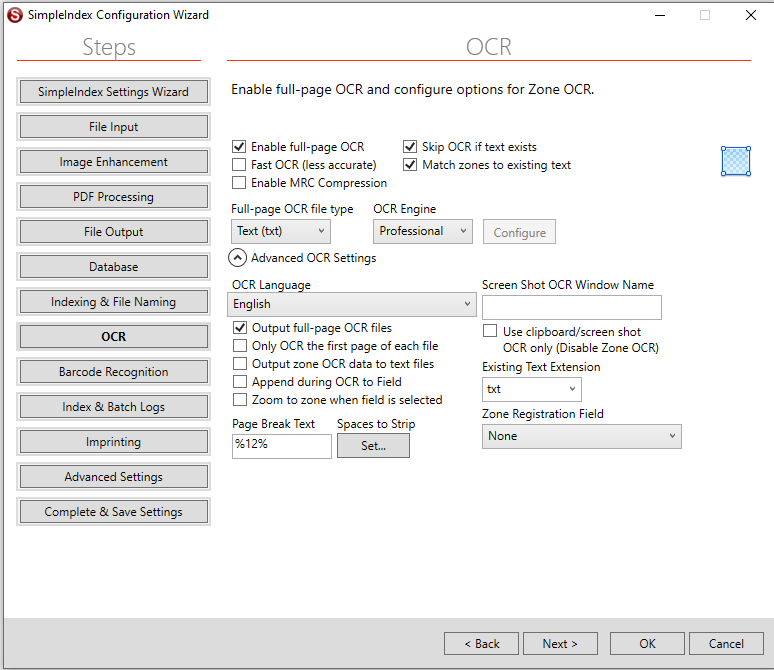
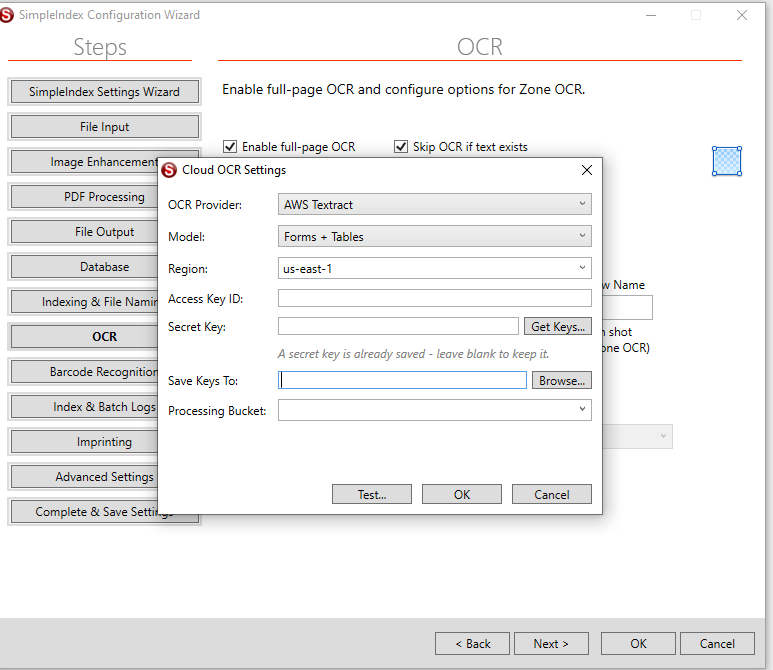
Some jobs read better with a cloud engine, for example free writing on a line or the service-line table on a claim. A cloud engine is switched on per job, never by default, in its own settings with your own account and keys.
Once it receives patient data, its provider is your business associate, and HIPAA requires a BAA with it first. Encrypting the data doesn’t change that.
| Engine | Where the page goes | Patient data | What you need |
|---|---|---|---|
| SimpleIndex local engines: FineReader, hand print, tick boxes, barcodes | Your computer | Fine for patient data | Nothing to sign |
| FlexiCapture, installed on your servers | Your network | Fine for patient data | Nothing to sign |
| AI models on your own computer (through Ollama) | Your computer | Fine for patient data | Nothing to sign, as long as the model runs on your own machine |
| AWS Textract | Amazon Web Services, in your own AWS account | With a BAA | Accept the AWS BAA in your AWS account before sending claims. Textract is on AWS’s HIPAA-eligible list |
| Azure OpenAI | Microsoft, in your own Azure resource | With a BAA | Covered by Microsoft’s BAA for Azure services. Check with Microsoft that your deployment and page-image inputs are in scope |
| Anthropic (Claude) API, OpenAI API | The AI provider | With a BAA | Both offer a BAA for their APIs that covers only some features: OpenAI’s is accepted in its API Platform, Anthropic’s is for commercial customers. Ask the provider which setup it covers |
| Other cloud AI services SimpleIndex can connect to (Google Gemini as connected today, DeepSeek, Groq, Together, Fireworks, Perplexity) | The AI provider | Not for patient data | No BAA covers the way SimpleIndex connects to them. Use them only for forms without patient data |
The BAA is between you and the provider. We can’t sign it for you. The providers’ everyday chat apps (ChatGPT, Claude or Gemini on a personal or small-business plan) aren’t covered; only some of their enterprise plans can be.
AI models on your own computer
SimpleIndex can read forms with an AI model that runs on your own computer or server through Ollama, such as Qwen, Gemma, Llama or DeepSeek-OCR. Nothing leaves your network, so it follows the same rules as any local engine. You need a computer with enough memory and, for speed, a graphics card.
Are we your business associate?
No. Selling you software that runs on your network doesn’t make us one: we don’t receive your patient data. We would become one if our support team saw patient data, for example in a remote session on a live batch or in files you send us, and we don’t sign business associate agreements in our current setup.
So we work without patient data: support sessions use sample or masked forms, and nobody opens a batch of real claims while we are connected.
For quotes and testing, please don’t send real patient forms. We’ll send you sample forms to try.
Checklist for your compliance officer
Six things to settle before the first real batch. They belong in your HIPAA risk analysis like any other system that holds patient data.
- Which engine each job uses, and whether any of them is a cloud engine
- A signed BAA with every cloud provider that receives patient data, and the setup it covers
- Who can open the scan, output and log folders, and the database the data goes to
- Where scans wait before processing, and that the scan folder is emptied afterwards
- How long the PDFs and exports are kept, and how they are deleted, under your retention policy
- That remote support sessions are agreed in advance and never show patient data
Questions
Is SimpleIndex HIPAA compliant?
No software is HIPAA compliant on its own. SimpleIndex lets you keep patient data on your own network, and you decide per job whether any cloud engine is used.
Can we use ChatGPT to read claims?
Not the everyday ChatGPT website. The OpenAI API can be covered by a BAA your organization accepts in OpenAI’s API Platform, for its eligible services only. A local AI model avoids the question altogether.
Is AWS Textract HIPAA eligible?
Yes. Textract is on AWS’s list of HIPAA-eligible services, so it can be used for patient data once you have accepted the AWS BAA in your account.
Do we need a BAA with you?
No. The software runs on your network, and our support works only with sample or masked forms, so we never receive patient data. We don’t sign BAAs in our current setup.
Does FlexiCapture send anything to ABBYY?
Not as we install it: FlexiCapture runs on your own servers and reads the forms there.
Last reviewed: 20 November 2026. This page explains how our products handle patient data; it isn’t legal advice. Sources: HHS guidance on cloud computing, HHS: is a software vendor a business associate?, AWS HIPAA eligible services.
Questions about your setup?
Tell us which forms you process and whether you plan to use a cloud engine. We’ll tell you what stays local and what needs a BAA.
Contact usor call +1 (865) 637-8986
Please don’t send real patient forms. We’ll send you sample forms to test with.
